Summary: This article shows you the complete guide and easy solution to convert and import Blu-ray movies to Apple TV 3 or future Apple TV 4 on your Mac (including Mountain Lion 10.8 and Mavericks 10.9).

Hello. I am in the process of purchasing a Blu Ray drive to use with my desktop Mac and will be purchasing a software program for converting my Blu Rays . I wish to play them on my Apple TV3 and the future AppleTV4. Will these blu rays be stored in the Home Video of ITunes ? Also when do I need to have external hard drive storage for my collections.? I have a 10.8 Mountain Lion 27" IMac. Thanks and looking forward to getting started.
Then how to get these blu-ray collection onto Apple TV 3 for watching as the above user asked?
As you know, Blu-ray disc or even the decrypted Blu-ray rips can’t be supported by Apple TV 3. The best solution is to rip and convert Blu-ray to iTunes compatible format then sync to ATV 3 for playback without any limit. Follow the guide below rip Blu-rays to Full HD 1080p MP4 files for viewing on Apple TV 3 on Mac.
System Requirements for ripping Blu-ray to iTunes and streaming to Apple TV on Mac
* Mac OS X 10.5/10.6/10.7/10.8/10.9
* Compatible Blu-ray Disc Drive
* Pavtube Blu-ray Ripper for Mac
* 2.4 Ghz Intel Core 2 Duo or faster processor
* At least 2 GB of RAM
* iTunes 10.6 or later
* A video driver that supports HDCP for Windows PC
* A display that supports HDCP with a screen resolution of 1280 x 800 or higher
* Apple TV 3rd generation
Step-by-step guide for ripping Blu-ray movies for Apple TV 3 on Mac
1. Make sure your Blu-ray Disc drive is well connected with computer, and put a source Blu-ray Disc to the BD drive. Mac is lacking of Blu-ray support and you need to add an external BD drive that is compatible with Mac.
2. Have Blu-ray Ripper installed on your computer. And free download Pavtube Blu-ray Ripper for Mac.
If you are windows users, read my old post how to rip Blu-ray to Apple TV.
3. Run the Mac Blu-ray to Apple TV 3 Converter. Press "Load Disc" icon to import Blu-ray movie. The software requires network connection to decrypt Blu-ray so keep your network wired.
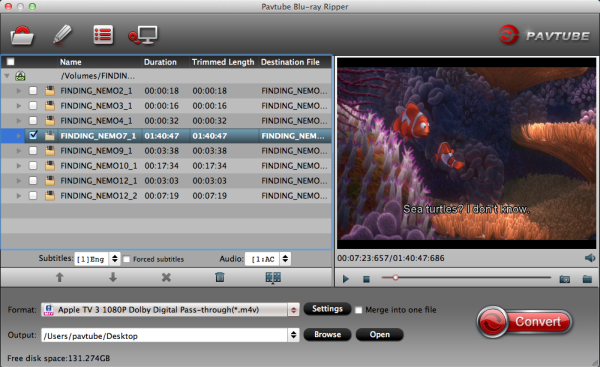
4. Select main movie from file list, and set subtitles and audio language for export.
5. Set iTunes/Apple TV 3 compatible format from the drop-down list of "Format". To export a Apple TV 3 1080p video with ac3 5.1 pass-through for AV receiver decoding, "Apple TV 3 Dolby Digital Pass-through (*.m4v)" preset is highly recommended.
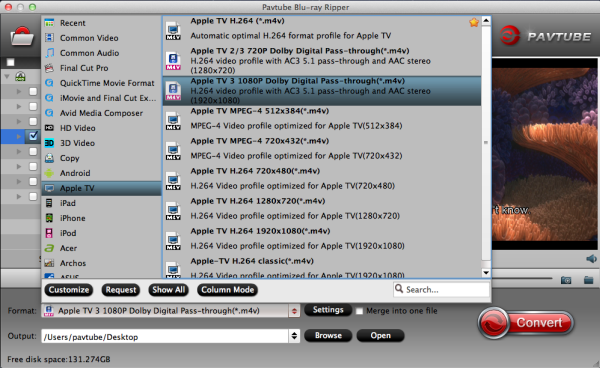
6. Press "Convert" to get Blu-ray Ripper start compressing Blu-ray to Apple TV 3 friendly videos.
7. When conversion completes, press "Open" to find compressed .m4v movie and add it to iTunes movie store. Open up iTunes and follow "File>> Add file to Library…" to sync ripped Blu-ray movie to iTunes.
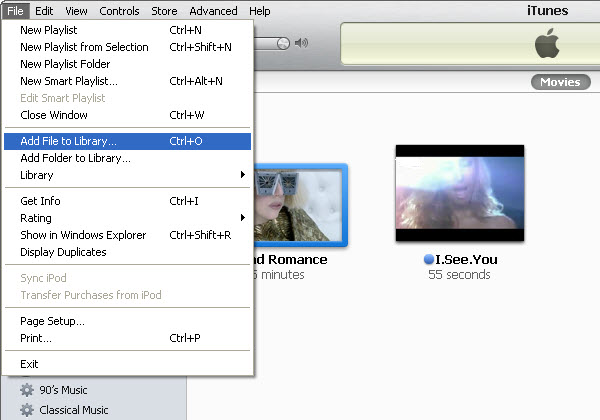
Now you can enjoy the Blu-ray movie with iTunes freely and stream the Blu-ray movie to Apple TV 3.
Apple TV 3 Related Articles:
Convert Blu-ray to Apple TV with AC3 5.1 surround sound on Mac
Stream DVD to Apple TV 3 with Dolby Digital 5.1 surround sound
Convert Blu-ray to Multi-track MP4 for Apple TV 3 on Mac
No comments:
Post a Comment