v dos

  • Subscribe to our RSS feed.
  • Twitter
  • StumbleUpon
  • Reddit
  • Facebook
  • Digg

Wednesday, August 28, 2013

Canon intros PowerShot G16, S120, SX170 IS, SX510 HS point-and-shoot cameras

Posted on 6:59 PM by Unknown

Canon's got a handful of incremental updates to detail, including a selection of PowerShot point-and-shoots. Now it announced the release of four new PowerShot cameras: the PowerShot G16, PowerShot S120, PowerShot SX510 HS and PowerShot SX170 IS.


Overall, The G16 is the priciest of the bunch, ringing in at $550. This model, which is set to ship in October, replaces last year's G15, and includes a 12.1-megapixel CMOS sensor, DIGIC 6 processor, 5x 28-140mm f/1.8-2.8 optical zoom lens and 1080/60p video capture. Next up is the S120, retailing for $450, also in October. This pocketable S110 replacement includes a 12.1-megapixel CMOS sensor, DIGIC 6 processor, 5x 24-120mm f/1.8-5.7 optical zoom lens and 1080/60p video capture. The SX510 HS is the cheapest of this premium bunch, with a $250 MSRP. This superzoom, expected in September, packs a 12.1-megapixel CMOS sensor, DIGIC 4 processor, a 30x 24-720mm f/3.4-5.8 optical zoom lens and 1080p video.

These cameras feature advanced DIGIC imaging technology and the ability to achieve faster autofocusing speeds than previous PowerShots. The G16 and S120 also feature the new Star mode to capture the brilliance of a starry night sky, while the new Background Defocus mode allows users to soften the background of their images.

For the connected photographer, the PowerShot G16, S120 and SX510 HS digital cameras come with built-in WiFi that allows for outstanding quality images and video files to be wirelessly transferred from the camera to social networking sites through CANON iMAGE GATEWAY, to a PC, or on their compatible iOS or Android device through the free Canon CameraWindow app. All initial setup can be accomplished from a smart device or computer, allowing for easy photo sharing on-the-go.

The PowerShot G16 is the first PowerShot in the G-series that comes equipped with built-in WiFi, the G16 has the ability to share images and video to Facebook, Twitter, YouTube, Flickr and email. The PowerShot G16 features a 28-140mm wide-angle lens with an aperture range of f/1.8 – f/2.8. The G16 is equipped with Canon’s HS System, which combines a DIGIC 6 image processor and a 12.1-megapixel High-Sensitivity CMOS image sensor for enhanced image quality. The PowerShot G16 also features improved AF times and reduced shooting lag over previous G-series models. The G16 has continuous shooting speeds of 9.3 frames-per-second. The G16 also captures 1080p Full HD video, and includes built-in stereo microphone and HDMI output.

In addition, the camera’s creative handheld HDR Scene mode automatically combines multiple shots of a scene to help create an image with a greater dynamic range without the necessity for a tripod. The G16 also features dials and controls similar to those on Canon’s EOS DSLRs. It’s also compatible with Canon Speedlite flashes and other accessories.

The PowerShot G16 is scheduled to be available in October for $549.99.


The PowerShot S120 features a 24-120mm extra-wide angle lens with an aperture range of f/1.8-f/5.7. It’s equipped with Canon’s HS System and allows for continuous capture of up to 12.1 frames per second at 12.1-megapixels. The S120 also records 1080p Full HD video and includes built-in stereo microphone and HDMI outputs.

The PowerShot S120 is scheduled to be available in October for $449.99.


The PowerShot SX510 HS camera has a 30X optical zoom 24mm wide-angle lens, intelligent IS technology, a 12.1 megapixel CMos sensor and Canon DIGIC 4 Image Processor. The SX510 also records 1080p Full HD video and built-in WiFi. The camera’s Zoom Framing Assist automatically maintains the correct distance from a subject using face recognition.

The PowerShot SX510 HS is scheduled to be available in September for $249.99.


The PowerShot SX170 has 16x optical zoom with a 28mm wide-angle lens and Optical Image Stabilization. The SX170S also features high-speed AF, an intelligent IS system, a DIGIC 4 Image Processor and a 16-megapixel sensor and 720p video. The PowerShot SX170 IS also has a 3-inch LCD screen and an ergonomic bod.

The PowerShot SX170 IS is scheduled to be available in September for $179.99.

Related news:

Nikon's Coolpix L620 14x superzoom ships next month
Canon Powershot N is a Facebook Ready Digital Camera

Source: Canon
Read More
Posted in camera, canon, G16, MOV, point-and-shoot, pointandshoot, powershot, PowershotG16, powershotS120, powershotSX170IS, powershotSX510hs, S120, SX170IS, SX510hs | No comments

Tuesday, August 27, 2013

Encode/Render Canon T3i .mov files to Prores 422 for Final Cut Pro 7

Posted on 8:16 PM by Unknown
Q1: Ok I'm really interested in buying the Canon T3i beacuse it has great video quality and its fairly cheap....I'm a newbie to FCP and shoot videos with a Canon Rebel T3i. Obviously, I can copy the .mov files from the SD card to my Mac and edit in Final Cut Pro 7, but it's a bear (slow rendering time and whatnot) and I'm never impressed with the video quality output once I'm done rendering. The files are 1280x720 format, 60 fps. How to import without rending? Any compressor to convert my files to a more FCP-friendly file?

Q2: Canon T3i is perfect and I'd rent one for a wedding, and I am stuck with working with Final Cut Pro 7. Cause as it stands now any time i go to Log and Transfer and try to import files i get messages like FCP doesn't recognize format or something like that. What I'm wondering is their a program out there that can convert the video files of a T3i to a file format that can be read in Final Cut Pro 7.


The Canon EOS Rebel T3i/600D is new of the remarkable digital SDL cameras. And reading previus discussions, we learn that many folks are eager to find a best Canon T3i video converter to get the T3i camera recognized in FCP 7.
 
At first you should know that Canon T3i records its movies as .MOV files using variable bitrate H.264 compression, which is much more conservative of memory card space, but not fit for editing in FCP 7. To help you to get Canon T3i mov files editable in Final Cut Pro 7, Pavtube Canon MOV Converter for Mac is the first choice for you to make smooth videos for editing in FCP 7. It makes it easy to convert Canon T3i MOV footage to ProRes 422 for FCP.

Encode/Render Canon T3i H.264 mov video to Apple ProRes 422 Codec for FCP 7

In order to process Canon T3i MOV footage fast and seamless in Final Cut Pro, it requires that the H.264 .mov videos to be transcoded into Apple ProRes codec, which is the best intermediate codec developed specifically for seamless Final Cut workflow.

Step 1. Load H.264 .mov footage to Canon H.264 MOV Converter.

Transfer h.264 encoded .mov files from Canon T3i camera to your Mac HDD via USB cable. Run Pavtube HD Video Converter for Mac as the best Canon MOV to FCP Converter, and click the "Add" button to load .mov footage.


Step 2. Set a FCP friendly codec (e.g. Apple ProRes 422) as export format.

Click on "Format" bar and set a FCP friendly codec in dropdown-list. You are advised to follow "Final Cut Pro" template and choose "Apple ProRes 422 (*.mov)" as export format.


Tips:

1. H.264 codec has a much higher compression ratio than Apple ProRes, so the ingested files are significantly larger than the original files.

2. If you prefer smaller file size, choose "Apple ProRes 422 (LT) (*.mov)" instead.

3. The "Apple ProRes 422 (Proxy) (*.mov)" format offers file size at SD levels and is recommended for 480i/p and 576i/p shootings.

Step 3. Set possible best quality for FCP 7 editing.

Click the "Settings" button and customize proper video/ audio parameters if necessary. Video size, bitrate and fame rate are flexible and can be adjusted as you like.

E.g. Set video size to 1920*1080 when you feel like to keep 1080p as the source file features. Or set "original" in video bitrate drop-down list to keep best quality. You may skip this step as well as default format works well with FCP too.

Step 4. Start the process to convert Canon T3i mov files to ProRes 422 for FCP by clicking the big "Convert" button.


  • Before you try to do the conversion, if you are also a FCP X user, please make sure that you have installed the Apple ProRes Codec manually since the FCP X asks users to install it by themselves.


Once the conversion is finished, you can click "Open" button to get the output files effortlessly.
Now you have got it right, feel free to import and edit Canon T3i mov files to Final Cut Pro 7.

  • Refer to the guide to import video files and projects into Final Cut Pro.

Additional editing features of the Pavtube Canon MOV to ProRes Converter:

1. Combine files together- check the files to be merged in file list and check 'Merge into one' box beside 'Settings' button.

2. Deinterlace- click 'Editor', switch to 'Effect' tab, find 'Deinterlacing' box, and check it to eliminate interlacing lines.

3. Thumbnail- click 'Snapshoot' button when previewing the video. Click 'Option' to set the image format of screenshots.

4. Trim a section of the movie- click 'Editor', switch to 'Trim' tab, and input time point in start and end box.

The Pavtube HD Video Converter for Mac supports a more variety of DSLR cameras than you expect – including Canon EOS 5D Mark III, EOS-1D Mark IV, EOS 5D Mark II, EOS 7D, EOS 60D, Rebel T4i, Rebel T2i, Rebel T5i and Nikon DSLR cams. Pavtube Video Converter reads standalone .mov files from Canon memory card. You don't need the full card structure, just pick up what you want to keep.

What's more:

Import/Edit Canon EOS T4i MOV in iMovie
Edit Canon 60D MOV in Movie Maker
Canon 650D MOV to Premiere and AE CS6
Read More
Posted in canon, canon rebel t3i and fcp 7, convert mov video to fcp friendly format, Edit Canon mov files in FCP 7, fcp can't read mov files, Final Cut Pro, get canon mov to work with final cut pro, MOV | No comments

Sunday, August 25, 2013

Transfer Sony PMW-320 XDCAM MXF Content to FCP X or FCP 6/7

Posted on 10:02 PM by Unknown
Follow this article, you will get the best solution to convert XDCAM MXF to FCP friendly Prores 422 codec, then you can easily solve Sony PMW-320 HD422 MXF editing problems with Final Cut Pro X and FCP 6/7 on Mac.

Sony is pleased to announce the introduction of the new PMW-320 XDCAM EX Camcorder. This new ½” shoulder mount camcorder joins the award-winning XDCAM EX product family of professional Solid State Recording acquisition tools. This new camcorder inherits all of the advanced creative recording features of the successful PMW-EX1, PMW-EX1R, PMW-EX3 and the PMW-350 camcorders, and also offers several enhancements such as improved low light capability as well as SD recording as a standard feature.

Similar to the PMW-350, the PMW-320 supports multiple frame rate recording such as 59.94i, 50i, and native 23.98P and 25P as well as being 1080i/720P switchable. Sony PMW-320 XDCAM camcorders' video format is MXF, using MXF footage on Mac is a big problem.

As XDCAM MXF format is not compatible with FCP X or FCP 6/7, if you want to edit Sony PMW-320 XDCAM MXF in Final Cut Pro, you'll need to download and install the Sony XDCAM Transfer Software. While, if you haven’t install these XDCAM import Plug-in for Final Cut Pro correctly, it’s still hard task to transfer Sony XDCAM media to FCP X or FCP 6/7.

Well, here is an easier way, that is, to convert Sony PMW-320 MXF video to FCP native ProRes 422 codec. To accomplish this goal, you just need a XDCAM to FCP Converter for Mac to help you. It can fast convert Sony PMW-320, PDM700, PDM-F800, PMW-100, PWM-200 camcorder XDCAM MXF to Apple Prores .MOV for editing in FCP X or FCP 6/7 without quality loss. It is an easy-to-use while high-efficient.
  • For users who need to deal with multi-track XDCAM MXF file, refer to the guide here.
Free download and install it, and this guide will tell you how to solve Sony PMW-320 HD422 MXF editing problems with Final Cut Pro X and FCP 6/7 on Mac step by step.


1. Install and launch this XDCAM to ProRes Converter. Import Sony PMW-320 XDCAM MXF footages to the converter.


3.Click Format bar to choose the output format. Click and choose Final Cut Pro -> Apple ProRes 422 (*.mov).


4.You can click "settings" to customize the output parameters, adjust the resolution, bitrate as you want.

5.Start convert Sony PMW-320 XDCAM to ProRes for FCP editing on Mac.

Click the "Convert" button to start conversion. The conversion processes will transcode Sony PMW-320 XDCAM MXF to ProRes MOV videos to be compatible with FCP X or FCP 6/7 editing.

After conversion, you can import video files and projects into Final Cut Pro without any trouble. Congratulations! You have successfully taken the first step to make your own masterpiece.

With this Sony XDCAM to ProRes Converter, you can easily change Sony PMW-320 XDCAM MXF files to FCP X or FCP 6/7 for editing, this software runs fast, so you can convert your XDCAM footages to FCP in less time, video and audio synchronization are perfectly guaranteed.

See also:

Editing Sony PMW-EX3 XDCAM MP4 with Mac
Transfer Sony XDCAM footage to QuickTime 
Sony PDW-F800 XDCAM HD422 MXF workflow in Avid MC and Premiere Pro
Read More
Posted in Final Cut Pro, import xdcam to fcp x, MXF, Sony, sony pmw-320 final cut pro, XDCAM, xdcam fcp plugin, xdcam to fcp 7, xdcam transfer fcp 6 | No comments

Thursday, August 22, 2013

Converting Canon XA25 MTS recordings to Apple FCP and Aperture 3

Posted on 8:27 PM by Unknown
Summary: In this tutorial, we intend to elaborate how to enable Apple Final Cut Pro and Aperture 3 to work with AVCHD MTS clips taken by Canon XA25.                                               


The XA25 is a compact, high-performance Professional camcorder designed specifically for "run-and-gun," ENG-style shoots with enhanced I/O connectivity. The XA25 offers a unique combination of high-precision optics, outstanding image processing, multiple Recording formats, flexible connectivity and intuitive User features.

The camcorder features both MP4 (up to 35 Mbps) and AVCHD (up to 28 Mbps) codecs at up to 1080/60p Resolution for virtually blur-free, high-quality capture of fast-moving subjects. Dual-band, built-in Wi-Fi technology allows easy FTP File transfer and Upload to the internet.

  • Canon XA25 Reviews
I have a ton of footage a client brought in that was shot on a Canon XA25 HD camcorder. They are .MTS files. I don't see any timecode on them. I need to get them into FCP and Aperture 3 to edit with. But FCP/Aperture 3 does not see this kind of format and will not import. Anyone have an efficient workflow for this?

Why would you meet the trouble? Because FCP, including FCP 6/7 and FCP X, and Aperture 3 cannot support the native AVCHD footages from Canon XA25. In order to transfer MTS files from the XA25 to FCP and Aperture 3, you need to transcode the MTS to ProRes 422, FCP and Aperture 3 compatible video format. 

Luckily, we found an app called Pavtube MTS/M2TS Converter for Mac, which is a versatile and professional AVCHD to FCP Converter, tired it and succeeded. 

Overall, it is not only the best MTS/M2TS Converter for Mac which can aid you to convert Canon XA25 AVCHD to ProRes 422 for FCP and Aperture, but also designed for fast transcoding, deinterlacing AVCHD MTS footage from Canon, Panasonic, JVC, and Sony full HD AVCHD camcorder/cameras that makes the MTS editing work much easier with Non-Linear Editing Systems on Mac.  

See also:
  • Edit Canon XA25/XA20 mts files in iMovie/FCE
  • Convert Canon XA25 AVCHD to QuickTime MOV
  • Import Canon XA25 AVCHD mts to Premiere Pro/After Effects CS6
  • Canon XA25 AVCHD work with into Avid MC and Xpress Pro

Easy Guide on Converting Canon XA25 MTS recordings to FCP and Aperture 3

1. Download Pavtube AVCHD to Prores Converter for Mac, it's an professional AVCHD converter on Mac which can convert Canon XA25 AVCHD files to different formats.

2. Install and launch this AVCHD Converter for Mac. Import the 1080p .mts footages from Canon XA25 to the converter.


3. Click "Format" bar to choose output format, you can click and choose Final Cut Pro -> Apple ProRes 422 (*.mov) as the best codec for editing in Apple Final Cut Pro and Aperture 3.


4. If you want to customize the output parameters, you can click settings button. Adjust the resolution and others as you need.

5. Click convert button to start the Canon XA25 AVCHD to ProRes 422 MOV conversion.

With Pavtube MTS/M2TS converter for Mac, you can easily convert Canon XA25 AVCHD files to Apple Final Cut Pro and Aperture 3 for editing with Prores 422 codec MOV format.

After converting, you can import videos to Final Cut and Aperture 3 for editing as you want.
Read More
Posted in Apple Aperture 3, canon, canon xa25 and apple aperture 3, canon xa25 to aperture 3, canon xa25 to fcp, convert mts to prores, Final Cut Pro, MTS, put Canon XA25 footage into FCP | No comments

Tuesday, August 20, 2013

Import Panasonic AG-HPX170/HPX171 P2 MXF files to FCP and Burn FCP projects to DVD on Mac

Posted on 8:04 PM by Unknown
Summary: Follow this post to know how to import Panasonic AG-HPX170/HPX171 P2 MXF to FCP for editing and burn FCP projects to DVD on Mac, hope it can solve you P2 mxf to FCP problem and dvd burning solution.

Every time that there is a need to hire a better camera it seems that everyone is hiring the Panasonic HVX200 and not the Sony EX1. So I have not had a chance to see how the HVX200's 4:2:2 with 720p helps with my Blue or Green Screen filming. I know that the EX1 produces a cleaner and better picture than the the Panasonic – or so I am told – but the colour decimation is 4:2:0, hmmm. But here is the Panasonic HPX170/171 that also has a much better picture but with 4:2:2 colour decimation. So this will be my best choice.


However, there cames another problem- How to import Panasonic AG-HPX170/HPX171 P2 MXF footages into FCP for editing smoothly on Mac?

The thing is, FCP does not work perfectly with the Panasonic P2 MXF codec. As far as I know, to solve the P2 MXF importing problems, the most important piece of the equation is that transcoding Panasonic P2 Card MXF files to a FCP's supported video format, like Apple ProRes (422).

If you looking for a solution for this problem likewise, check out Pavtube MXF Converter for Mac which is entitled as a top P2 MXF Converter. It supports encoding Panasonic P2 and Canon MXF files and Sony XDCAM MXF to FCP native format so that you can easily import the Panasonic AG-HPX170/HPX171 P2 MXF recordings to FCP for editing on Mac.

  • See also:  Import Panasonic AG-HPX170/HPX171 P2 MXF to iMovie and FCE 

So follow the quick tutorial below to transcode Panasonic AG-HPX170/HPX171 P2 MXF to FCP compatible format and then edit in FCP or burn to DVD on Mac.

Part 1: How to import Panasonic AG-HPX170/HPX171 P2 MXF files to FCP? 

  • For FCP X users, pls make sure you have installed ProApps QuickTime Codecs, or you may get files only without video. You can download it from here:

    http://support.apple.com/kb/DL1396

1. Free download Pavtube MXF Converter for Mac trial version, install and launch it.


2. Click "Add video" or "Add from folder" icon to load Panasonic AG-HPX170/HPX171 MXF files into Pavtube application.


3. Select Final Cut Pro friendly output format.

Apple ProRes 422 is considered as the best format for FCP, so you are recommended to choose "Apple ProRes 422 (*.mov) as target format from "Format" > "Final Cut Pro".


4. Start Panasonic AG-HPX170/HPX171 P2 MXF to Apple ProRes 422 conversion.

Click the big "Convert" button to start encoding Panasonic AG-HPX170/HPX171 P2 MXF to Apple ProRes 422 MOV for Final Cut Pro.

When completes, locate the converted MOV files from target file path by clicking "Open" icon.

Now, open up Final Cut Pro, choose File > Import > Files…to select and load the generated ProRes 422 MOV files to FCP for editing use.

  • How to import P2 footage to Final Cut Pro directly from a P2 card

Part 2: Burn FCP projects to DVD on Mac

Pavtube DVD Creator for Mac adds support for MXF files burning, it can burn single file or folder structure videos, you can burn MXF/FCP projects to DVD disc in few steps, just follow it:

1. Install DVD Creator for Mac, connect your DVD Writer and insert a blank DVD. Add your videos into the DVD Creator for Mac

2. Edit movie clip and Customize your DVD menu. You can edit your videos with trim, crop, watermark, effect settings, audio replacing settings features.


3. Preview Created DVD-Video and click burn button to start burning.


See more:

How to edit Panasonic P2 card MXF files in Mac OS X
Convert Panaonic AG-HPX 600 MXF to edit in iMovie/FCE
Import Panasonic HPX3100 P2 MXF to Avid MC
Edit Panasonic P2 MXF footage in DaVinci Resolve on Mac
Encode Panasonic/Sony/Canon MXF to FLV for YouTube uploading
Premiere Pro and Panasonic P2 MXF Workflow on Mavericks
Read More
Posted in burn fcp projects to dvd, convert Panasonic MXF to Prores, Final Cut Pro, import p2 mxf to FCP, MXF, panasonic, Panasonic P2 MXF Converter, transcode Panasonic P2 MXF for FCP | No comments

Monday, August 19, 2013

Best Way to convert Canon HF G30 AVCHD footage to Premiere Pro CS6 and After Effects CS6

Posted on 7:30 PM by Unknown
Summary: With following this guide, you can smoothly import and edit Canon HF G30 50p/60p AVCHD footage in Premiere Pro CS6 and After Effects CS6 by transcoding Canon 50p/60p .mts to Premiere/AE CS6 most compatible MPEG-2 video.


The new Legria HF G30 (also known as the Vixia HF G30 in the US) from Canon has the same imaging system, but without the XLRs and is aimed at enthusiast videographers, such as hobbyists or film students. Their HD video system has been completely redesigned – from the lens through to the image sensor and processor – to improve imaging performance. There are various advanced shooting features and connectivity options to suit different types of applications, from news and documentaries to weddings.

This camera is awesome, I've had it almost a month now and was able to put it through it's paces on a Disney cruise to Alaska. It was amazing with great control in manual mode with auto exposure and worry free shooting in auto mode where all my settings were taken care of.

But now I have a question. I'm working on a documentary project using a Canon HF G30; I had problems working with AVCHD Progressive files genereted by HF G30 and I was very worried because both Premiere Pro CS6 and After Effects CS6 didn't support the 1080 50p/60p .mts files. To make this kind of file compatbile, I tried to convert the Canon HF30 AVCHD footage with various programs but the results was no more an HD progressive file.

Then I tried this amazing program, Pavtube MTS/M2TS Converter for Mac , and I'm very happy of the converted files: no loss of quality, the same high resolution, same colors and defitition.It works fast and with an incredible quality; I tried to compare the original files with the converted one and I could not find differences, I even analysed the two files with professional instrumens and compared the flow on a professional monitor, this program it's simply great! Now I have successfully converted Canon HF G30 50p/60p MTS footage to editable formats not only for Premiere Pro CS6 and After Effects CS6 editing, the converted files work perfectly with these pofessional editing programs!!! Just follow the step-by-step guide I shared below to get the work done smoothly.

Convert Canon HF G30 50p/60p
.mts to Premiere Pro CS 6 and After Effects CS6 editable format

Step 1: Copy Canon HF G30 50p/60p .mts media on to the Storage Drive in a folder.

Step 2: Launch the best Canon AVCHD Converter for Mac. Click the "Add" button for adding to import the 50p/60p mts files from Canon HF G30 to the best Mac G30 MTS/M2TS Converter.


Step 3: Click on the dropdown menu of "Format", and then move your pointer to Adobe Premiere/Sony Vegas> MPEG-2 (*.mpg) which is the perfect video format for you to transfer MTS to Adobe Premiere Pro CS6 and After Effects CS6.


Then you can set the output folder by clicking "Browse" icon as you prefer.

Step 4: Click "Settings" icon to adjust audio and video parameter. You can change the default codec, bit rate, frame rate, sample rate and audio channel according to your needs and optimize the output file quality.

Note: To get original(best) video quality, you can keep original video size and bitrate.

Step 5: Click the "Convert" button and it will losslessly convert Canon HF G30 AVCHD 50p/60p mts files to MPEG-2 for editing in Premiere Pro CS6 and After Effects CS6 immediately.

Step 6: Once the Mac MTS to Premiere and AE CS6 conversion is done, you will be able to get the output files for Adobe Premiere Pro CS6 and After Effects CS6 via clicking on "Open" button effortlessly.

Now you can easily and correctly import the converted video in Premiere Pro CS6 and After Effects CS6 for editing keeping high quality.

More related links:

Edit Canon XA20 in FCP and burn to DVD on Mac
Convert Canon XA20 50/60p mts and mp4 video to iMovie/FCE
Solve Canon XA20 1080/60p mts to Premiere Pro importing issues
Import Canon XA20 1080/60p AVCHD to Avid Media Composer
Get Canon XA20 1080/50p mts video files to play with QuickTime
Share Canon XA20 mts video on Youtube with subtitles
Canon XA20 MTS/MP4 importing workflow on Windows
Importing 1080 60p/50p mts from Canon XA20 into Aperture 3
Read More
Posted in Adobe Premiere, After Effects, canon, canon avchd work with after effects, canon hf g30 and premiere pro, encode 60p mts for premiere cs6, import hf g30 avchd to mac, MTS, transcode canon 50p mts to ae cs6 | No comments

Sunday, August 18, 2013

Enable Sony PMW-200 XDCAM MXF to work with Final Cut Pro

Posted on 11:34 PM by Unknown
Summary: From this article, you can learn the best way to import Sony PMW-200 XDCAM MXF footage into Final Cut Pro on Mac by transcoding Sony XDCAM HD422 MXF to Prores for FCP.

 
The PMW-200 is Sony's successor to the hugely popular PMW-EX1 Camcorder. It is the first handheld camera in its class to be equipped with 3 x 1/2-inch Exmor CMOS sensors for excellent sensitivity and enhanced depth of field characteristics. Sony PMW-200 can record in Full HD 4:2:2 at 50 Mb/s, delivering exceptional performance, operational versatility and workflow efficiency. Its high-quality MPEG HD422 50 Mbps recording is fully compliant with the latest EBU commendations for long-form broadcast production and is widely accepted in broadcasting stations and production houses.

After making some 50 Mbps MPEG HD422 recordings from Sony PMW-200, you may find the MXF files are not support by Final Cut Pro on Mac natively. To solve the importing problem with Sony PMW-200 MXF and FCP workflow. Of course, you can choose to get a XDCAM Transfer. While, things can be different if you get some help from third-party software.

Now come and meet this Pavtube Sony XDCAM MXF Converter, which is capable of converting Sony PMW-200 MXF footage to Prores encoded mov files for that's the most compatible format for FCP. 


  • See also: How to import Sony PMW-200 XDCAM MXF files in iMovie on Mac  


How to convert Sony PMW-200 1080 50i MXF to Final Cut Pro on Mac

Step 1. Connect your Sony PMW-200 to mac and keep it on, or use a card reader to transfer your footage to mac. Get this MXF Converter for Mac installed, click top left two icons to load individual videos or the entire folder correspondingly.


Step 2. Choose best format for editing in Final Cut Pro.

Click the drop-down list besides Format, choose Final Cut Pro > Apple ProRes 422 (*.mov) as the most compatible format as well as best video quality for FCP.


Step 3. Adjust output video settings including video size, codec, bitrate, frame rate by clicking Settings, all according to your needs.


Step 4. Click the big red circle to start conversion. Wait for a while, you can get the fresh hot converted video which is compatible with Final Cut Pro.

Tips:


Pavtube MXF Converter for Mac support outputting the original one audio track separately; if you want to retain and combine all the audio tracks, the Pavtube iMixMXF is highly recommended.

Pavtube iMixMXF integrates all features of Pavtube MXF Converter for Mac and multi-track preserving and mixing features. Other than the unique multi-track preserving feature, you can also Mix the multi tracks into one track for broadcasting. And this makes the iMixMXF as a wonderful MXF Audio Mixer. And this feature enables you to mix the audios of interviewer, interviewee, surroundings, or editors'/directors' comments into one.

More related:

Edit PDW-700 XDCAM MXF in Movie Studio Platinum Suite 12
Work Natively with Sony PMW-EX3 XDCAM on Mac
Convert Sony XDCAM MXF files for iMovie 11
Transfer Sony XDCAM footage to QuickTime MOV on Mac
Read More
Posted in convert xdcam mxf to prores, edit xdcam mxf in fcp, enable mxf to work with final cut, Final Cut Pro, make mxf compatible with fcp 7, MXF, Sony, sony pmw-200 xdcam and fcp x, XDCAM | No comments

Thursday, August 15, 2013

Why can't I open Sony PMW-200 XDCAM MXF files in iMovie on Mac?

Posted on 10:10 PM by Unknown
Summary: Follow this article below, you will learn how to use Sony XDCAM Converter to convert Sony PMW-200 XDCAM MXF video to iMovie for editing with best optimized codec. 


Hi, I filmed using Sony PMW-200 camcorder and want to edit in iMovie. Somehow iMovie could not recognize my MXF footage. How can I solve this? Any reliable workflow recommended?

Designed to meet the needs of broadcast productions, Sony PMW-200 records on to solid state media using 50 Mbit/s 4:2:2 XDCAM HD, also record using the same 35 Mbit/s 4:2:0 codec as the original EX cameras as well as standard definition DV. 

As the PMW-200 records MPEG HD422 codec MXF format, you will meet the incompatiblity problem when importing Sony PMW-200 MXF into iMovie as above. So how to get Sony PMW-200 XDCAM MXF files be editable in iMovie with the lossless quality?

It is easy--- a quicker and easier way is to convert Sony PMW-200 XDCAM MXF to iMovie compatible AIC MOV format. Thus, the third party component is vital in achieving your goal. 

The best tool for you is the Pavtube MXF Converter for Mac, the powerful Sony XDCAM MXF Converter for Mac. It can convert all the .mxf files, no matter where and how you get them, to ProRes, AIC or DNxHD with the original quality. 

Here listed the three-step guide on how to transcode Sony PMW-200 MXF files to AIC for iMovie.

Step 1: Install Pavtube XDCAM Converter for Mac. Click "add video" button to import the mxf files from Sony PMW-200, click "add from folder" button to add MXF folder, or you can also directly drag and drog mxf clips to the program.


Step 2: Click on the "Format" and get the dropdown menu, then move you pointer to "iMovie and Final Cut Express -> Apple Intermediate Codec (*.mov)" to choose it as best codec and format for iMovie editing.


Step 3: You can customize the output settings as you want, such as resolution, bitrate, frame rate and video/audio codecs.


Step 4: Start to convert Sony PMW-200 XDCAM MXF files to iMovie.

Click the "Convert" button, the MXF to AIC Converter for Mac will start to transcode Sony PMW-200 XDCAM HD422 MXF to AIC .mov for iMovie.

After the XDCAM MXF to AIC conversion, you can easily add the Sony PMW-200 MXF files to iMovie and edit them by clicking on "import" button. And now, you can get rid of the worries about the incompatibility problem of Sony PMW-200 MXF and iMovie.

Tips:

If your MXF files have 2 audio tracks or more, here is a new program specially designed for multi-track preserving and mixing features, named iMixMXF. Featured formats include: MOV/MP4/MPG/WMV/FLV/MKV and more.

Read more:

Editing Sony PMW-200 50Mbps MXF with Final Cut Pro
Work with Sony XDCAM in FCP, Avid, iMovie, Premiere Pro
Import XDCAM files into After Effects CS4/CS5/CS6
Edit Sony XDCAM MXF in Movie Studio Platinum Suite 12
Sony PMW-320 MXF and Avid Media Composer
Transfer Sony XDCAM footage to QuickTime
Read More
Posted in can't open xdcam mxf in imovie, get sony xdcam editable in imovie, iMovie, imovie not recognize .mxf, MXF, PMW-200 MXF and iMovie, Sony, XDCAM incompatibility problem | No comments

Wednesday, August 14, 2013

Canon XA20 MTS/MP4 importing workflow in Sony Vegas, Avid, Premiere, Pinnacle, Cyberlink and Windows Movie Maker

Posted on 8:07 PM by Unknown
Summary: To edit Canon XA20 mts/mp4 files smoothly on your editing software including Sony Vegas, Avid, Premiere, Pinnacle, Cyberlink, Windows Movie Maker, you need to transcode mts/mp4 to AVI/MOV/WMV/MPEG-2 for Windows editing software at first. And this article will show you how.

Canon XA20 is one of the new announced Ultra-Compact Professional Camcorder which cover the needs of the professional that need compact cameras with pro feature sets.

First off, Canon heard the cries for 1080/60p from the masses and it looks like they're finding ways to please the end-users. With 1080/60p & 1080/24p in both AVCHD (28mbps) & MP4 (35mbps) codecs, everyone is covered. Plus, the 20x Optical HD Video Zoom Lens with 8-Blade Circular Aperture mounted to the 2.91 Megapixel HD CMOS Image Sensor will help make anyone's day brighter. Second, Canon has added WiFi to the cameras to enable file transfers on the go, making them perfect tools for ENG & EFP applications.


Since AVCHD/MP4 is quite complicated codec and format, currently there are not much software being able to support the AVCHD and mp4 video. Actually, you can't directly import Canon XA20 mts/mp4 footage into Windows editing software like Sony Vegas, Avid, Premiere, Pinnacle, Cyberlink, Windows Movie Maker, etc. That's why so many users asking if there are any easy solutions that can help them edit XA20 mts/mp4 files on Windows Editors.

To make Canon XA20 mp4/mts video workable with  Sony Vegas, Avid, Premiere, Pinnacle, Cyberlink and Windows Movie Maker , you only need to convert XA20 MTS/MP4 video files to AVI/WMV/MPEG-2, the most suitable video format for editing on Windows PC.

Now go to find Pavtube Video Converter Ultimate.Lots of users are impressed by this converter since it is powerful enough to convert camcorder videos to multiple video formats for iOS/Android/Windows Tablets & Phones and HD Media Players as well as video editing software including Adobe Premiere, Sony Vegas, Avid Media Composer, and more. And you can enjoy the powerful edit function, like trim, crop, watermark for text, image and video, 3D effect, subtitles and so on.

The following guide will show you how to transcode/convert Canon XA20 MTS/MP4 files to AVI/MOV/WMV/MPEG-2 for Sony Vegas, Avid, Premiere, Pinnacle, Cyberlink, Windows Movie Maker.

Download it and follow below steps.

Step 1. Load Canon XA20 MTS/MP4 files.

You can choose "add video" directly or "load files" to add the whole folder.


Step 2. Select output format for video editing software.

Click "Format" menu you will find various video formats listed by different devices. Just choose a compatible video format for your editing software. Choosing the editing software option directly will help you to take less time to find a more preferable video format.


Step 3. Edit loaded Canon XA20 MTS/MP4 video files.

Click "Edit" button and you are allowed to trim, crop, add text/image/video watermark or some effect to your output video for making it perfect. Here the function of adding subtitles to output files will contribute to make your own videos. You can use free software Subtitle Edit to edit your subtitle content then add it to output videos.


Tips: Click "Settings" on the interface and you can adjust the parameters including size, bitrate, frame rate, etc. to get a high quality of output files. And keep the settings the same as original video recordings will provide you the least loss of video quality.

Step 4. Start conversion.

Click the "Convert" button to start conversion. When it completed, click the "Open" button to get the generated videos for your editing software.

More features about it:

1. Rip and convert Blu-ray and DVD including 1:1 backup Blu-ray/DVD movies to PC hard device for future needs.

2. Directly Copy feature will save 100% intact .M2TS main movie from original BD disc.

It is an integration of Blu-ray Ripper, DVD Ripper and Video Converter and it will meet almost all your requirements about converting videos. Good news for you that Pavtube 2013 Summer Holiday Sale Round 2 is coming and 20% discount is provided to Video Converter Ultimate and iMedia Converter for Mac during sale time. Catch the chance to try it now.

Now get ready for importing and editing Canon XA20 MTS/MP4 videos in Sony Vegas, Avid, Premiere, Pinnacle, Cyberlink and Windows Movie Maker. Enjoy your editing workflow!

Learn more XA20 video tips: 

Edit Canon XA20 in FCP and burn to DVD on Mac
Convert Canon XA20 50/60p mts and mp4 video to iMovie/FCE
Solve Canon XA20 1080/60p mts to Premiere Pro importing issues
Import Canon XA20 1080/60p AVCHD to Avid Media Composer
Get Canon XA20 1080/50p mts video files to play with QuickTime 
Read More
Posted in Adobe Premiere, avid edit mp4 file, Avid Media Composer, canon, convert mts to mov, does premiere compatible with mp4 video, Movie Maker, MTS, Sony Vegas, transcode xa20 video on windows | No comments

Tuesday, August 13, 2013

Sony RX100 Mark II (M2) Hands-on -Sony's best point-and-shoot camera to date

Posted on 7:11 PM by Unknown

Last year, Sony's RX100 changed the way many of us think about point-and-shoots. The camera's one-inch sensor enabled brilliant image quality and stellar low-light performance, netting DSLR-like results in a device you can slip in your pocket. It really did change the game when it comes to everyday photography, and I instantly fell in love. What remained to be seen, however, was how Sony would build on the RX100's success by releasing an even more capable model this year. In an unexpected move, the company opted not to retire 2012's blockbuster, and kept pricing exactly where it's always been, at $650. The RX100 Mark II, meanwhile, was marketed as a modest step up -- an even more well-rounded package, for 100 bucks more.


When my Mark II sample arrived, I did what any jaded New Yorker would after a half-dozen years of shooting sample photos in Manhattan: I booked a flight to somewhere else. United's last-minute weekend specials made Chicago the best bet, and off I went for a weekend of perfect weather, approachable restaurants and sidewalks that weren't so crowded that I had to walk in the street. It's like New York -- if you take away a million tourists and pepper in smiling Midwesterners and affordable adult beverages.

Key Features:

  • 1"-type Exmor-R BSI-CMOS sensor (13.2 x 8.8mm, 3:2 aspect ratio) 
  • 20.2 million effective pixels 
  • 28-100mm (equiv), f/1.8-4.9 Carl Zeiss Vario-Sonnar T* lens 
  • Steady-Shot image stabilization 
  • ISO 160-12,800 (Down to ISO 100 and to 25,600 expanded) 
  • NFC-mediated Wi-Fi allowing file transfer and control from smartphones 
  • Rear control dial and customizable front control ring 
  • 10fps continuous shooting in 'Speed Priority' mode 
  • Tiltable 3" 1.2M-dot 'WhiteMagic' LCD screen 
  • 13 Picture Effects (27 with variations) 
  • Memory Recall feature can store up to three groups of custom settings 
  • 1080p60 video, (AVCHD) with MP4 option (50p in PAL regions) 
  • Built-in stereo microphones 
  • 330-shot battery life (CIPA)  
The final notable physical adjustment is the new Multi Interface Shoe. It looks like a typical hot shoe that you'd find on any ol' DSLR, but this version adds a multi-pin connector for interfacing with accessories like an OLED EVF or a microphone rig -- neither of which I needed to try out on a brief vacation. Some photographers clearly prefer shooting with an EVF, but the tilting LCD suited me just fine, even with the bright summer sun hitting the camera from above.


The pictures, as expected, look great. The camera did a fine job of exposing, and colors and white balance were spot on. Everything I loved about the previous RX100 is present here, too, so you can absolutely expect a top-shelf experience through and through. The one notable setback is the price. It'll run you $750, which admittedly is a bit more than we'd like to pay for a point-and-shoot, regardless of its performance. But when you start looking at this strictly as an ILC replacement, that sky-high price tag begins to make a bit more sense. Cheap it's not, but if you want the absolute best, consider this your only option.

Read More
Posted in cyber-shot, MTS, News, rx100, rx100m2, Sony | No comments

Monday, August 12, 2013

Convert NXCAM to H.264- Transfer Sony NXCAM AVCHD video for playback and sharing

Posted on 10:48 PM by Unknown
AVCHD from Sony NXCAM is not really a friendly format for playing/sharing and usually we go from Sony NXCAM to H.264 converting and this article will provide the detailed info.


For the past few days, I've been evaluating a prototype of Sony's first NXCAM camera family member. This first NXCAM model has a striking resemblance to a Sony Z5, which is an HDV tape-based camcorder with optional chip recording. Announced on November 18th, Sony's new NXCAM family brand offers class-leading, professional performance for AVCHD technology.

Sony NXCAM records stunning quality 1920 x 1080 images at 24Mbps (50i or 25p), and operational flexibility is maximised by AVCHD recording onto affordable and readily available consumer memory cards. Now I have a client who is a NXCAM user, he passed to me a bunch of .mts files came from his NXCAM with no camera info. He want to get some suggestion for playing and sharing NXCAM AVCHD video on Mac.

Then I recommend him to look for a converter that can convert NXCAM MTS files to H.264, thus, after enjoying the video on Mac, he can also transfer the H.264 files to media players or video devices for playback or sharing. He tries some converter from the web, but only received an error message while converting NXCam video to h.264. Didn't get to write it down because the app crashed. And then want me to give him some hope.

In that case, I will share my easy solution here. Since H.264 is fully supported by most media players and video uploading website, first you need to transcode NXCAM AVCHD MTS to H.264 with the top NXCAM AVCHD Converter for Mac from Pavtube.

For background, the app from Pavtube worked the first time we tried it but not this time. It works perfectly in converting NXCAM AVCHD video to H.264 codec. Not only is it extremely easy to use but it's also often faster than any other Compressor. What's more, it can convert NXCAM mts videos to other common target readable format in which you want the video to be played. Then it has quickly become my absolute favorite way of converting my Sony NXCAM footage. Well, below is a step-by-step guide for you.

Guide to convert Sony NXCAM AVCHD videos to H.264 for playback and sharing

1. Install and run the best Mac NXCAM to H.264 Converter. Transfer Sony NXCam video to hard drive, and then click "Add video" or "Add from folder" to add the avchd files you need into the program.


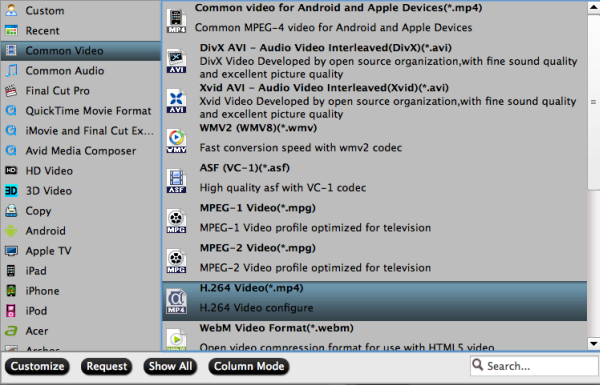
2. Click Format column and choose the output format, you can choose "H.264 Video (*.mp4) from "Common Video" for output. This is the perfect format for playing on Tablets/Smartphones and sharing on website.


3: Click settings button to adjust the output video’s parameters, such as bitrate, resolution, etc.

4. You can edit the Sony NXCam videos in this program before converting to other formats on Mac OS. Trim, crop, add watermark or adjust effect as you want.

5. Start converting Sony NXCAM AVCHD video to H.264 MP4 for Mac.

In this way, you can use Sony NXCAM recorded MTS footages to playback or sharing. Please take a try now, hope it will do a great favor for you.

You can find more related guides in Pavtube Sony Column:

How to enable FCP 7/FCP X to handle Blu-ray movies?
Convert DVD to multi-track Prores for FCP X on Mac Mavericks
How to get Adobe Premiere Pro to edit a DVD on Windows/Mac
Read More
Posted in convert sony nxcam to h.264, how to play sony nxcam video, MTS, NXCAM, nxcam avchd and h.264 codec, NXCAM AVCHD Converter, Sony, transfer sony nxcam mts for uploading | No comments

Importing/editing Canon 5D Mark III H.264 mov files in FCP X on Mac

Posted on 2:05 AM by Unknown
Summary: From this article, you can know the best codec for importing Canon 5D Mark III mov clips to Final Cut Pro X editing on Mac, and only transcode Canon MOV to ProRes 422 or ProRes 422 HQ with Canon H.264 MOV Converter.

The Canon 5d Mark III that everyone has been waiting for has been announced. The camera brings a handful of improvements including speed, greater resolution, more processing power, and more options for shooting HD video. The full-frame sensor has been upped to 22.3 Megapixels and shoots up to 6 frames per second with a 61-point AF system. What’s great about the new sensor in this camera is that the pixel pitch is smaller, which allows for better low light performance.


I have really gotten everything I wanted out of my 5D Mk III. Best camera I ever had, it shoots mov files – which pains me is that FCP X could not recognize my mov footage. Did I miss something?

After searching, I find that the reason, that is, Canon 5d Mark III records video in H.264 MOV, it is not supported by FCP X perfectly. To edit Canon 5d Mark III mov video with Final Cut Pro X smoothly, I need to encode Canon mov recordings to FCP X compatible codec - Apple ProRes 422 MOV format on Mac.

Now on the web, I came accross this Pavtube H.264 MOV to ProRes Converter for FCP X. I am impressed by how quickly the converter runs to give me the files from my 5D MK-III that I need for Final Cut Pro X, becides it make it possible to do some little editing some simple editing features. You can follow the steps below to convert 5D Mark III mov footages for editing in FCP X.

Step 1: Free Download the best Canon MOV to FCP Converter. Install and run it on you Mac. It’s excellent Canon MOV video converter which can convert nearly all canon cameras’ videos to any formats you need, such as Apple Prores 422 MOV, Apple InterMediate Codec MOV, QuickTime MOV, etc.

Step 2: Click “Add videos” to load individual videos, or click “Add from folder” to load the whole folder from Canon 5D Mark 3.


Tips:

If you have multiple MOV files, you can select the “Merge into one file” box to merge the MOV files into one single file so that you can play these files without interruption.

Step 3. Click on the “Format” and get the dropdown menu, then move you pointer to “Final Cut Pro”.

Here we recommend the Apple ProRes 422 (*.mov) or Apple PreRes 422(HQ) (*.mov) for as best video format for editing in FCP X as well as good video quality. Then you can set the output folder by clicking “Browse” icon.


Step 3. Click the “Settings” icon and you will go into a new interface named “Profile Settings”.

You’d better set the video frame rate as 30fps, video size as 1920*1080 to keep the best quality for editing in Final Cut Pro X. If you want to have a smaller file size but keep the good quality, you can change the video size to 1440*1080.


Step 4: Click the “Convert” button; it will convert Canon 5D Mark III H.264 MOV to ProRes 422 for FCP X on Mac immediately.

Tips: Before you try to do the conversion, if you are also a FCP X user, please make sure that you have installed the Apple ProRes Codec manually since the FCP X asks users to install it by themselves.

After the workflow, you can go to the output folder to find the converted video files. Now you are free to import the ProRes 422 MOV to FCP X under Mac without rendering.

This Canon MOV Converter for FCP can help you convert the video format/codec you need quickly, video and audio quality are best guaranteed. You can also follow this article: How to Import Media contents to Final Cut Pro X for editing. 

Related article:
Canon EOS M to ProRes
Edit T2i/550D MOV in FCP X
Convert 650D/T4i MOV to Prores for FCP
Import/Edit Canon EOS T4i MOV in iMovie
Insert Canon 6D MOV to FCP
Import video files from T5i/EOS 700D in FCP
Transcode Canon EOS 650D/T4i MOV to Premiere and AE CS6
Read More
Posted in canon, canon mov and final cut pro, canon mov to fcp converter, convert canon mov to prores, fcp x not recogonize .mov, Final Cut Pro, import canon h.264 mov in fcp x, MOV | No comments

Thursday, August 8, 2013

Easy Solution to import Panasonic HVX200 MXF to iMovie 8,9,11 on Mac OS X Mavericks

Posted on 11:51 PM by Unknown
Summary: If you cannot use iMovie 8, iMovie 9, iMovie 11 on Mac OS X Mavericks to edit Panasonic HVX200 MXF file, do not be upset, below article will show you the solution about how to transcode Panasonic HVX200 P2 MXF to iMovie compatible format.


Panasonic AG-HVX200 answers the demands of the professional HDTV photographer with a compact and feature packed acquisition tool. This versatile prosumer High Definition camcorder packs an array of features into a handheld design. For recording video, the HVX200 includes a Mini DV tape mechanism along with two P2 (Professional Plug-in) card slots. The P2 cards allow for true variable frame rates and recording options that Mini DV tape can't offer. These include DVCPRO HD 1080/24p and 720/60p, along with normal interlaced video.

My work with the prototype camera I used over a period of six weeks started with what I know, which is 720p/24p. The P2 card of AG-HVX200 is capable of storing large amounts of video and audio data in MXF-format files. I prefer iMovie for editing with AG-HVX200, but I failed to open the MXF files with iMovie many times. (iMovie 11, Mac Mavericks). I am looking for the easy-to-use and reasonably priced converter to make my MXF files from AG-HVX200 to be readable in iMovie. I have more than 200 MXF files, I need to batch process them. Can anyone help regarding this conversion?

As far as I know, in order to edit Panasonic AG-HVX200 MXF files in iMovie 8,9,11 flawlessly, the best best method is to convert Panasonic MXF to Apple InterMediate Codec (AIC) which is a best editing codec for iMovie 8,9,11.

At first, you need 3rd-party tool- Pavtube MXF Converter for Mac

It is a professional MXF to iMovie Converter which can not only convert Panasonic AG-HVX200 recorded MXF files to AIC for iMovie 8,9,11 editing on Mac OS X Mavericks, but also provide simple video editing functions for you. This Mac MXF Converter is especially designed for converting Panasonic P2 MXF, Sony XDCAM MXF, Canon XF MXF files for editing in Final Cut Pro, Final Cut Pro X, Final Cut Express, iMovie, Avid, Adobe Premiere etc. Below is how.

Guide - Encode Panasonic AG-HVX200 MXF to AIC for iMovie 8, 9, 11 editing on Mavericks

Step 1. Import MXF files from Panasonic AG-HVX200 to the top MXF to iMovie Converter for Mac.


(Note: Before conversion, you need to transfer MXF files from your Panasonic AG-HVX200 to Mac Hard Drive, then click the "add" button to browse to import MXF videos. This MXF Converter for Mac support batch conversion)

Step 2. Click the Format bar, and move mouse cursor to "iMovie and Final Cut Express -> Apple InterMediate Codec (AIC) (*.mov)", it's the best format for editing in iMovie 8,9,11.


Step 3. Click "Convert" button to start transcoding Panasonic AG-HVX200 MXF files to AIC Codec for iMovie 8,9,11 under Mac OS X 10.9 Mavericks.

Some more helpful features of the app:

1. Settings- click to set video resolution(1920×1080/1440×1080/1280×720/720×480), bitrate(from 1Mbps to 20Mbps), frame rate (24p/30p)


2. Editor (next to "Add" icon)- click to set deinterlace, denoise, mute, volume up, trim, crop, etc.

So there you have it. Pretty simple. After the workflow, you can go to the output folder to find the converted video files. Now you are free to start importing/editing Panasonic AG-HVX200 MXF files in iMovie 8,9,11 under Maveircks without problems.

See Also:


Edit Panasonic AG-HVX200 P2 MXF in Avid Media Composer
Get Panasonic AG-HVX200 P2 MXF to Final Cut Pro 6/7
Does Final Cut Pro X support Panasonic HPX2100 P2 mxf
Premiere Pro and Panasonic P2 MXF Workflow 
Read More
Posted in convert mxf to aic, hvx200 to mac, iMovie, MXF, mxf to iMovie converter, p2 mxf to imovie, panasonic, panasonic mxf to imovie | No comments

Wednesday, August 7, 2013

Sony F55/F5 XAVC 4K videos and Avid Media Composer, Xpress Pro workflow

Posted on 8:15 PM by Unknown
This article outlines how to ingest Sony F55/F5 XAVC footage to import into Avid Media Composer and Xpress Pro for smooth editing.

The Sony PMW-F55 CineAlta 4K Digital Cinema Camera functions an eight.9MP Super 35mm image sensor, capable of capturing 4K, 2K and HD resolution video within a wide variety of formats by way of the camera's internal recorder. The F55 is amongst the initial digital motion image cameras using a international shutter, which fully eliminates motion skew and also other "rolling" shutter distortions.

XAVC is usually a video format that was introduced by Sony and extensively exist in Sony PMW-F55 and Sony PMW-F5. It may assistance 4K resolution (4096 x 2160 and 3840 x 2160) at as much as 60 frames per second (fps). XAVC supports colour depths of 8-bits, 10-bits, and 12-bits. Chroma subsampling is usually four:two:0, four:two:two, or four:four:four.


Having a lots of clips from my Sony F5 in 4K XAVC file format and want to edit them with Avid Media Composer and Xpress Pro, but often failed. How to resolve it?

Since Avid Media Composer and Xpress Pro (especially some versions) doesn't support the lastest 4K XAVC videos, to solve the incompatible problem, I have to convert Sony F5/F55 4K XAVC video to a native format for editing in Avid Media Composer and Xpress Pro.

By Google search, I find an excellent Mac XAVC Video Converter called Pavtube iMedia Converter for Mac which is specially designed to convert Sony F5/F55 4K XAVC to Avid friendly DNxHD mov format for editing in Avid Media Composer and Xpress Pro at high fast conversion speed and excellent output quality. No matter you are an expert or novice, you could easily use it for its intuitive interface.Just take a look at the brief guide below.

1. Download Pavtube iMedia Converter for Mac, it's an excellent Mac XAVC to Avid Converter. Follow the prompts to install the program. Click "Finish" when the installation is complete, and it will launch automatically.

2. Click "Add Video" to load 4K video files or directly drag the files into file list.


3. Click "Format" bar to determine output format. 

For natively editing in  Avid Media Composer and Xpress Pro, you are recommended to choose Avid Media Composer -> Avid DNxHD (*.mov), this format is best for native editing.


4. If you would like to customize the video and audio parameters, you can click "settings", adjust the parameters as you want, like Video Codec, aspect ratio, bit rate, frame rate, Audio codec, sampling rate, bit rate, channels.


5. Click "Convert" to start.

Pavtube XAVC to Avid converter can help you to convert Sony F5/F55 4K XAVC video to Avid DNxHD MOV for Avid Media Composer and Xpress Pro natively for editing.

XAVC Related:

How to play XAVC video on QuickTime on Mac?
Edit XAVC in Pinnacle, Cyberlink, Squeeze and Movie Maker
Ingest 4K XAVC Codec in Aodbe Premiere Pro
Read More
Posted in 4k xavc and avid workflow, Avid Media Composer, edit sony xavc with avid xpress pro, make xavc workable with avid mc, native conver xavc to avid dnxhd, Sony, XAVC, xavc to avid converter | No comments
Newer Posts Older Posts Home
Subscribe to: Comments (Atom)

Popular Posts

  • How to play 1080p Blu-ray on WD TV Live Plus Media Player
    If you are just curious about how to play 1080p Blu-ray on WD TV Live Plus Media Player, get the best BD ripping tools/applications to rip B...
  • Getting a SRT file to MP4- How to add srt subtitles to MP4 video natively?
    Summary:  In most of cases, people can get some awesome foreign movies without the subtitles. If you want to add srt subtitles language to y...
  • Play Amazon WMV movies on Samsung Galaxy Note 3
    Summary : Here you will find the easiest way to remove the protections and turn the Amazon movies and TV shows into a friendly format (H.264...
  • Sony PMW-400 XAVC camcorder Review -XAVC video format latest news
    Sony  gave its XAVC codec another boost at NAB in Las Vegas with the introduction of a new broadcast camcorder that supports it. It also ext...
  • Does iMovie 9 recognise 1080p MTS video from Panasonic HC-X920?
    Summary : How to get iMovie 9 to work with 1080p mts footage from  Panasonic HC-X920  perfectly? The is  easy workaround   to convert Pan...
  • Top MTS to FCP Converter- Fast convert Panasonic AG-HMC150 AVCHD to Prores HQ for FCP X
    Description: Can't import Panasonic AG-HMC150 mts files to Final Cut Pro X? Follow the article below, you will get to know the easy way ...
  • Canon C500 Workflow - Two ways to import MXF footage (Mult-track) from C500 to FCP X
    Summary:  Here are top two ways to import Canon C500 MXF to Final Cut Pro X, you can follow it to solving the problem "FCP X doesm'...
  • Watch Blu-ray movie on Kindle Fire HDX 8.9 with perfect video quality?
    Description : This article guides you to rip Blu-ray movies to Kindle Fire HDX 8.9 supported format so you could easily watch your Blu-ray m...
  • How to Convert QuickTime movie to iMovie on Mac OS X 10.9 Mavericks
    If you don't know how to smoothly import QuickTime movie to iMovie on Mac OS X 10.9 Mavericks, just read this article, you will get the ...
  • Convert M2TS with DTS for Playback on PS3 with AC3 5.1 Surround
    This guide shows you how to convert an m2ts file (with DTS audio) to AVI/MP4 so that it can be played on the Playstation 3  with AC3 5.1 sur...

Categories

  • .mts videos are not recognized
  • 1080p
  • 1080p resolution
  • 1080p to 720p converter
  • 14-bit
  • 2013 best Christmas Gifts
  • 2013 best gifts for dad
  • 2013 Black Friday Coupons
  • 2013 Christmas wishes
  • 2013 Cyber Monday Coupons
  • 2013 father's day best gifts
  • 2013 father's day gift guide
  • 2013 Halloween Discount
  • 2013 Mother's Day Promo
  • 2014 Father's Day Gift
  • 2014 Father's Day Sale
  • 2014 Mother's Day giveaway
  • 2014 Mother's Day specials
  • 2014 new movie review
  • 2014 summer coupons
  • 2014 summer freebies
  • 2014 summer holiday deals
  • 2014 top video converter review
  • 2014 Valentine giveaway
  • 24fps
  • 3D
  • 3D AVCHD Converter
  • 3D Blu-ray Ripper for Mac
  • 3D Blu-ray to 3D conversion
  • 3D Blu-ray to 3D MP4
  • 3D converter
  • 4k
  • 4K Ultra HD Video Converter
  • 4K Video Converter
  • 4k xavc and avid workflow
  • 4k xavc s converter
  • 4K XAVC to Adobe Premiere
  • 4k xavc workflow
  • 50D
  • 5D
  • 5dMark iii
  • 70d
  • 720p
  • 720p LCD TV
  • 7D
  • A65
  • A77
  • AAC to AC3 Converter
  • ActionCamera
  • add a dvd to my ipad
  • add avi files to iphone 5c
  • add avi to surface 2
  • add mkv to xperia z2
  • Add SRT to MP4
  • add subtitle to MP4
  • add videos to iTunes
  • adobe
  • Adobe cannot ingest XDCAM
  • Adobe CS 6
  • Adobe Premiere
  • After Effects
  • Age Of Heroes
  • aic
  • AJ-HPX3100 P2 MXF to Mac
  • Amazon Videos to Galaxy Note 3
  • Android
  • app
  • Apple
  • Apple Aperture 3
  • apple aperture 3 mov support
  • Apple devices
  • apple prores
  • Apple TV Dobly Digital
  • Apple TV ultimate convert
  • Arnold Schwarzenegger
  • Asus
  • audio problem with iMovie
  • avchd
  • avchd converter
  • AVCHD converting tool
  • AVCHD Imoporting on windows pc
  • AVCHD to Apple Aperture 3 editing
  • AVCHD to FCP Workflow
  • avchd to imovie solution
  • AVCHD to Prores
  • AVI
  • avi to galaxy tab 3
  • avi to imovie
  • avi to imovie converter
  • avid edit mp4 file
  • Avid Media Composer
  • Backup
  • backup all your movie
  • backup Arnold Schwarzenegger DVDs
  • backup bd on home entertainment system
  • Backup Blu-ray collections
  • backup blu-ray on mac
  • Backup Blu-ray to MKV
  • backup blu-ray to nas
  • backup dvd
  • backup dvd to home server
  • backup dvd to mkv file
  • backup iron man 3 dvd
  • bd digital copy to sony xperia z1
  • bd main movie backup
  • Best 4K XAVC Video Converter
  • best bd ripper for Surface
  • Best Black Friday Gifts
  • best Blu-ray Ripper
  • Best Blu-ray Ripper for Mac
  • best Blu-ray to M2TS backup
  • best br ripper
  • best canon eos to FCP Converter
  • best Canon MXF Converter
  • best Canon MXF Transcoder
  • Best Cyber Monday Gifts
  • best dvd ripper
  • best dvd ripper for windows 8.1
  • best dvd to fcp converter
  • best ipod video converter
  • best mac bd ripping tool
  • best mac blu-ray backup tool
  • best mts/m2ts player on mac
  • best MXF converter
  • best mxf converter for mac
  • Best P2 MXF Converter to FCP
  • best tool for flv playback
  • best Valentine gift
  • best video converter review
  • Best Video Editing Tool
  • best video profile for Final Cut Pro
  • Black Friday Best Game
  • Black Friday Free Gifts
  • Black Friday Game 2013
  • Black Friday Promotion
  • Black Friday Specials
  • Black Magic
  • Blackmagic Design HyperDeck Studio
  • Blackmagic DNxHD to MOV
  • Blackmagic MXF to ProRes
  • blu-ray converter for android device
  • blu-ray for iphone 5c
  • blu-ray playback on roku 3
  • Blu-ray Ripper
  • blu-ray ripper for avid
  • blu-ray ripper for MemoPad
  • blu-ray ripper for nexus 7
  • Blu-ray ripping
  • Blu-ray to 3D SBS MP4
  • Blu-ray to Apple TV 3 for viewing
  • blu-ray to avid mc
  • blu-ray to galaxy notepro
  • blu-ray to kindle fire hdx converter
  • blu-ray to lossless mkv
  • blu-ray to mkv ripping
  • blu-ray to mp4
  • blu-ray to multi-track mp4
  • blu-ray to premiere pro cs6
  • blu-ray to wd tv live plus
  • blu0ray to mkv rip for roku 3
  • burn Canon MOV to DVD
  • burn fcp projects to dvd
  • burn mp4 video to dvd on mac
  • burn mxf to dvd on mac
  • burn xavc file to dvd
  • bytecopy
  • ByteCopy coupon code
  • bytecopy for mac review
  • bytecopy giveaway
  • bytecopy v1.0
  • Bytecopy vs DVDfab
  • c300
  • camcorder
  • camera
  • can eos
  • can fce load 60p mts
  • can galaxy tab 3 play mts
  • can Windows Movie Maker recognize mts
  • can't open xavc with quicktime player
  • can't open xdcam mxf in imovie
  • can't put MKV to iTunes
  • cano vixia video converter
  • canon
  • Canon .mts import to FCP
  • Canon .mxf files can't open in ae
  • Canon 1D and FCP
  • canon 1D final cut pro plugin
  • Canon 5D Mark iii
  • canon 6d and fcp x
  • canon 70d
  • Canon 70D workflow with iMovie
  • canon avchd converter
  • canon avchd to fcp x
  • canon avchd work with after effects
  • Canon C300 MXF to FCE 4
  • Canon C300 MXF to iMovie 11
  • canon c500 mxf to fcp
  • canon c500 to final cut pro
  • canon c500 workflow
  • canon hf g30 and premiere pro
  • canon mov and final cut pro
  • canon mov converter for mac
  • Canon MOV to FCP
  • canon mov to fcp converter
  • Canon MTS to Premiere
  • canon mvi converter
  • Canon MXF Converter
  • canon mxf converter mac
  • Canon MXF to FCP 6
  • canon powershot
  • Canon PowerShot S110 to FCP
  • canon rebel t3i and fcp 7
  • canon vixia mts converter
  • canon xa25 and apple aperture 3
  • canon xa25 to aperture 3
  • canon xa25 to fcp
  • canon xf codec
  • Canon XF ok with AE on Mac
  • canon xf plugin for fcp
  • Canon XF100 MXF to FCP X
  • canon xf100 to fcp x
  • canon xf100 to final cut pro x
  • canon xf100 workflow
  • Canon XF305 and Final Cut Pro
  • Canon7D
  • change format from mts to swf
  • change Sony XAVC for cyberlink
  • changing mvi format to avi
  • Christmas Best Seller
  • Christmas Giveaway 2013
  • Christmas movie entertainment
  • Christmas Special Offer
  • collect classic DVD movies
  • collect Rambo
  • color
  • colorcorrection
  • compatibility of Canon AVCHD with Mac
  • compress 4K UHD video
  • convert .mts files from Canon C100
  • convert 3D video
  • convert 4K UHD video
  • Convert 4K Ultra HD
  • convert amazon wmv to note 3
  • convert AVCHD to AIC
  • convert avchd to dnxhd
  • convert avi to imovie
  • convert bd for roku 3
  • convert blu-ray for asus
  • convert blu-ray for wdtv
  • convert blu-ray to atv 3
  • convert blu-ray to dnxhd
  • convert blu-ray to kindle fire hdx mp4
  • convert blu-ray to lossless mkv
  • convert blu-ray to mp4
  • convert Blu-ray to play on ipad
  • convert blu-ray to premiere
  • convert Blu-ray to Prores
  • convert blu-ray to quicktime on mavericks
  • convert Canon mov to AIC
  • convert canon mov to prores
  • convert canon mts to prores
  • Convert Canon MXF to MOV
  • convert canon vixia avchd to win
  • convert dvd
  • convert dvd for nexus 7
  • convert DVD ISO to Apple TV 3
  • convert dvd on windows 8.1
  • convert dvd to kindle fire hd
  • convert dvd to mkv
  • convert dvd to mp4 for playback
  • convert dvd to mp4 with multi-track
  • convert dvd to multi-track mov
  • convert dvd to multi-track mp4
  • convert dvd to surface pro
  • convert DVD to youtube WebM
  • convert flv to mpeg
  • convert Gopro Hero 3 video on Mac
  • Convert HX200V AVCHD to Mac
  • convert jvc mts files to fcp
  • convert m2ts to mkv
  • Convert MKV AAC to AC3
  • convert MKV for ps3
  • convert MKV to Fire HDX 7
  • convert mkv to imovie
  • convert mkv to prores
  • convert mov video to fcp friendly format
  • convert mp4 to aic
  • convert mts to aic
  • convert mts to Apple ProRes
  • convert mts to edit in imovie
  • Convert MTS to FCP X
  • convert mts to mov
  • convert mts to prores
  • convert mts to quicktime
  • convert mts to sony vegas 12
  • convert mts to swf
  • convert multi-track mxf files
  • convert mvi to avi
  • convert MXF files on Windows PC
  • convert MXF for playback
  • convert mxf to after effects
  • convert mxf to aic
  • convert mxf to mkv
  • convert MXF to MOV
  • convert mxf to mp4
  • convert mxf to multi-track prores
  • convert mxf to pinnacle studio 16
  • convert mxf to premiere
  • convert MXF to ProRes
  • convert MXF to ProRes LT
  • convert mxf to quicktime on mac
  • convert p2 mxf to mpeg-2
  • Convert P2 MXF to multi-track ProRes
  • convert p2 mxf to prores
  • convert P2 MXF video on Mac
  • convert Panasonic MXF to Prores
  • convert Panasonic TS30 to fcp 6
  • convert quicktime mov to aic
  • convert Sony AVCHD to AIC MOV
  • convert sony avchd to prores
  • convert sony nxcam to h.264
  • convert sony xavc file to quicktime mov
  • convert Sony XAVC on windows
  • convert video to apple
  • convert videos to galaxy tab 3
  • convert videos to iphone 5s
  • convert videos to xperia z2
  • convert World Cup Video to ipad
  • convert xavc s to aic
  • Convert XAVC to MPEG-2 for Premiere
  • convert xavc video files
  • convert xdcam mxf to prores
  • Convert XF305 MXF to Prores MOV
  • copy blu-ray to android phones
  • copy blu-ray to apple tv
  • copy blu-ray to mkv
  • copy blu-ray to wd tv
  • copy br selection for watching
  • copy digital copy to nexus 5
  • copy dvd contend with mkv
  • copy dvd movie
  • copy dvd onto hard drive
  • copy dvd onto home server
  • copy dvd to Galaxy Tab 4 7.0
  • copy dvd to mac with multi-track
  • copy frozen for kids
  • create dvd from sony pmw-400
  • Cyber Monday 2013 deals
  • Cyber Monday Promotion
  • Cyber Monday Specials
  • cyber-shot
  • Cyberlink
  • cybershot
  • d800e
  • Data Rescue
  • DaVinciResolve
  • difference between 1080p and 720p
  • digital copy to kindle
  • digital copy to nexus 5
  • digital copy to sony xperia z1
  • Digital SLR
  • does Avid support native .mts
  • does iTunes spport flash videos
  • does premiere compatible with mp4 video
  • downconvert 1080 mts to 720p
  • download movies on kindle fire hdx
  • DRM Removal tool
  • drm video converter
  • DRM Video Recorder
  • DSLR
  • dts to ac3 5.1
  • dualISO
  • dvcpro mxf
  • DVD
  • DVD Burnning
  • dvd converter for surface
  • dvd digital copy to sony xperia z1
  • dvd ifo to Kindle Fire HD
  • dvd iso kindle converter
  • dvd iso to Kindle Fire HDX
  • DVD maker on Mac
  • dvd movies march 2014
  • dvd ripper for mac 3.7.0
  • dvd ripper for windows 4.5.0
  • DVD Ripper offers
  • dvd ripper updated
  • DVD ripper with multi-track
  • dvd ripping software
  • DVD to Apple TV 3
  • DVD to Galaxy Converter
  • dvd to Galaxy Tab 4
  • dvd to home server
  • dvd to iphone
  • dvd to iphone 5c
  • DVD to Kindle Fire HD
  • dvd to mp4
  • dvd to mp4 conversion
  • dvd to mp4 with multi-track
  • DVD to multi-track converter
  • DVD to multi-track MKV
  • dvd to multi-track mov converter mac
  • dvd to multi-track mp4
  • dvd to surface rt
  • DVD to WebM
  • DVD to WebM converter
  • dvd to xbox360
  • DVD Uploading
  • DVDfab
  • E-P5
  • Easiest Video Editor/Converter
  • Easter coupon 2014
  • Easter Day Special Discount
  • Easter Sales 2014
  • Easter Sunday Special Offer
  • edit
  • edit 50/60p mts on avid mc
  • edit AG-HPX370 mxf in fcp
  • edit AVCHD in iMovie
  • edit avi with imovie
  • edit Canon 70D MOV with iMovie
  • edit Canon C300 MXF on Mac
  • Edit Canon mov files in FCP 7
  • edit Canon MOV on Mac
  • Edit Canon XF305 MXF video in FCP 7
  • edit dvd in final cut pro
  • edit gh2 mts with 720p resolution
  • edit Gopro Hero mp4 with pc
  • edit hf m306 mts on mac
  • edit jvc footage with fcp
  • edit mkv in final cut pro
  • edit mov with fcp
  • edit mp4 in iMovie
  • edit mts files in xpress pro
  • edit multi-track file in pinnacle
  • edit mxf on mac
  • edit mxf with premiere on mac
  • edit nikon mov in aperture 3
  • edit nikon mov in fcp x
  • edit or share panasnonic videos on mac
  • edit panasonic mxf in fcp x
  • edit Sony DSC-WX30 on win
  • edit Sony EX3 in Premiere
  • edit sony fs700 with final cut pro
  • Edit Sony MTS file in FCE
  • edit sony mts in fcp
  • edit Sony XAVC in pinnacle
  • edit sony xavc s in imovie
  • edit sony xavc with avid xpress pro
  • edit tivo in wmm
  • edit video in iMovie correctly
  • edit vixia hf r40
  • edit World Cup TiVo in Avid MC
  • edit XDCAM in iMovie
  • edit xdcam mxf in fcp
  • editing GH3 60P AVCHD in FCP X
  • editing mov in Premiere
  • Editing MTS with iMovie
  • editing MXF Files on win and mac
  • editing sony mts in imovie
  • enable mxf to work with final cut
  • encode 60p AVCHD for QuickTime
  • encode 60p mts for premiere cs6
  • encode Canon C300 MXF to mov
  • encode MKV to MP4
  • encode mkv with dts to mp4
  • encode mvi to hd avi
  • encode MXF Multi-audio tracks
  • encode MXF to Apple Prores
  • Encode MXF to ProRes 422
  • encoded video with ac3 codec
  • encoding mxf for premiere pro
  • enjoy blu-ray by chapter
  • enjoy holiday season
  • EOS
  • error compiling moive unknown
  • Expendables
  • Facebook Weekend Special
  • Father's Day Biggest Discount
  • father's day coupon code
  • father's day coupon code 2013
  • father's day gift guide
  • father's day gift ideas
  • father's day special offer 2013
  • fathers day special offer
  • fcp can't read mov files
  • fcp x not recogonize .mov
  • FCP X Panasonic GH3
  • FDR-AX1
  • Final Cut Express
  • Final Cut Pro
  • Final Cut Pro workflow
  • Fire HD DVD Ripper
  • Fire HDX 7 MKV Converter
  • fire hdx play drm videos
  • firmware
  • flv to mpeg conversion
  • flv to mpeg converter
  • Free Data Recovery Software
  • Free M2T Converter for Mac
  • Free M2TS Converter for Mac
  • Free MTS Converter for Mac
  • FS700
  • G16
  • g1x
  • G5
  • galaxy bd ripper
  • galaxy tab 3 mkv
  • galaxy tab 3 video converter
  • Galaxy Tab 4 dvd ripper
  • get .mts to Final Cut Pro
  • get a new copy of dvd movies
  • get ag-hpx371 mxf into fcp
  • get aperture read mov files
  • get canon mov to work with final cut pro
  • get downsized 1080p video to premiere
  • get dvd onto iphone
  • get dvd playback on mac
  • get DVD/ISO into iTunes
  • get HC-X920 to work with iMovie
  • get iMovie work with panasonic wa03
  • get jvc mts onto mac
  • get sony xdcam editable in imovie
  • get SRT file to MP4
  • get video off sony fs700 to mac
  • getting blu-ray into iTunes for apple tv 3
  • GH3
  • giveaway glarysoft
  • gopro
  • Gopro Hero 3 Video converter
  • Gopro Hero 3 video transfer
  • h.264
  • H.264 MOV to ProRes
  • H.264 to AIC Converter
  • Hailey's 22th birthday
  • Halloween best gifts
  • Halloween Giveaway 2013
  • Halloween holiday promotion
  • Halloween Sale
  • HandBrake Alternative for Windows 8.1
  • hands-on
  • handycam
  • Happy birthday
  • happy holiday
  • happy new year
  • HD Media Players
  • HDC-2570 HD Portable Camera
  • hdpostcross
  • Hero 3 Black Edition workflow
  • hero2
  • hero3
  • how can i play dvd on ipad
  • how to convert p2 mxf on mac os x p2 mxf to apple prores 422
  • how to play sony nxcam video
  • hvx200 to mac
  • ifa
  • ifa2013
  • iFonebox
  • iMixMXF
  • iMovie
  • iMovie and Canon C100
  • imovie edit panasonic avchd
  • iMovie import mp4
  • imovie mts solution
  • imovie no audio
  • imovie not recognize .mxf
  • imovie not recognize mts file
  • iMovie supported codec
  • imovie won't show mts file
  • import 1080p h.264 mov in FCE
  • import AVCHD to iMovie
  • import avi to imovie
  • import blu-ray to avid
  • import blu-rays to FCP
  • import canon h.264 mov in fcp x
  • import canon mov into fcp
  • import canon mxf to fcp
  • import canon mxf to fcp x
  • import dvd to fcp
  • import hf g30 avchd to mac
  • import mkv files to fcp
  • import mkv to imovie
  • import mov in apple aperture
  • import MOV to Premiere
  • import mts footage to avid mc
  • import mts into imovie
  • import mts to premiere
  • import mxf into premiere pro cs6
  • import mxf to ae cs6
  • import mxf to imovie
  • import p2 mxf to FCP
  • import p2 mxf to final cut pro
  • import panasonic 1080 60p mts
  • Import Panasonic MXF to FCP with multi-track
  • import Panasonic P2 MXF to FCP 7
  • import Panasonic TS30 AVCHD to FCP 7
  • import rx100 MTS to iMovie
  • import sony avchd to fcp
  • import sony mts to avid mc
  • import sony mts to fce 4
  • Import Sony VG10 MTS to iMovie
  • import Sony XDCAM MXF to iMovie 11
  • import tivo to Avid
  • import TS files to Avid
  • Import XAVC to Premiere
  • import xdcam ex media to fcp x
  • import XDCAM to after effects
  • import xdcam to fcp x
  • importing .tivo into movie maker
  • ingest JVC MXF to FCP 7
  • ios
  • ios data recovery
  • iOS Data Recovery for Mac Giveaway
  • ipad data recovery
  • iPad Data Recovery Giveaway
  • iphone 5c movie playback tips
  • iphone 5c wmv playback
  • iphone 5s dvd ripper
  • iphone 5s/5c supported video format
  • iphone data recovery
  • iPhone Data Recovery Giveaway
  • ipod touch data recovery
  • ISO
  • iso converter for xperia
  • itunes data backup
  • iTunes Data Backup Giveaway
  • iTunes Data Recovery Giveaway
  • iTunes VOB video
  • join m2ts files into one
  • join m2ts with encoding
  • JVC
  • jvc everio avchd and fcp
  • jvc mts converter mac
  • JVC MXF to FCP
  • kindle fire hdx blu-ray playback
  • kindle fire hdx blu-ray player
  • kindle fire hdx play digital copy
  • leak
  • load mts to fcp
  • Load Sony VG20 MTS to iMovie
  • load Sony XAVC to ae
  • Lossless AVCHD Editor
  • lossless back blu-ray disc
  • lossless back blu-ray dvd
  • lossless m2ts output
  • lossless m2ts to mkv conversion
  • Lossless MTS M2TS Editor
  • lossless rewrap m2ts files
  • Lumix
  • LUT
  • m2ts dts converter
  • m2ts to mkv xvid
  • m2ts to quicktime format
  • m2ts with dts to ps3
  • mac
  • mac bd ripper for ppro
  • Mac Blu-ray Converter
  • mac os
  • Mac OS X 10.9 Mavericks
  • mac prores converter
  • mac stream blu-ray to ipad mini 2
  • MagicLantern
  • make a copy of dvd
  • make copy of blu-ray on mac
  • make full copy of blu-ray disc
  • make MOV into dvd iso
  • make mts editable in FCP 6
  • make mxf compatible with fcp 7
  • make xavc workable with avid mc
  • MakeMKV
  • MakeMKV vs Bytecopy
  • MakeMKV vs DVDfab
  • manual
  • march 2014 blu-ray movie
  • Mavericks 10.9
  • mavericks blu-ray ripper
  • Mavericks mov converter
  • Mavericks MTS Converter
  • Media Magician for Mac
  • Media Player
  • merry christmas
  • MicroFourThirds
  • Microsoft
  • mirrorless
  • mix MXF multiple audio tracks into one track
  • Mix two audio channels into one
  • mkv converter for ps3
  • mkv to fcp x
  • mkv to imovie aic
  • mkv to imovie converter
  • mkv to imovie workflow
  • MKV to Kindle Fire HDX 7
  • MKV to PS3
  • mkv to surface 2
  • mkv to windows device
  • Mother's Day best gifts
  • Mother's Day Big Sale
  • Mother's Day coupon code
  • Mother's Day promotion
  • MOV
  • mov converter
  • MOV to DVD
  • mov to fcp converter
  • mov to fcp x
  • mov to Premiere
  • move AVI to iTunes
  • Movie
  • Movie Maker
  • movie playback with blu-ray
  • movie release
  • Movie review
  • Movie Trailer
  • MP4
  • MP4 AAC to AAC
  • mp4 to aic converter
  • mpg on galaxy tab 3
  • MTS
  • MTS Converter Mac
  • MTS files not read by fcp
  • mts playing in slow motion
  • MTS to AIC MOV
  • mts to fcp
  • MTS to iMovie conversion
  • MTS to iMovie Converter
  • mts to prores 422
  • MTS to ProRes 422 HQ
  • mts to sony veagas 12 editing
  • mts to swf
  • mts to swf converter
  • Multi-track
  • multi-track mxf to mkv
  • multi-tranck mxf converter
  • multipelife
  • multitracks MXF Converter
  • MVI
  • MXF
  • MXF audio Mixer
  • mxf converter mac
  • MXF DNxHD to FCP
  • mxf mixer
  • mxf multimixer
  • MXF not reading by premiere
  • mxf premiere pro editing format
  • mxf retain multi-audio channels
  • MXF to Aperture 3
  • mxf to avi cnoverter
  • mxf to avi with multi-track
  • MXF to AVI/WMV/MPG/MP4/FLV
  • mxf to fcp
  • MXF to FCP Converter
  • MXF to FCP with Prores
  • mxf to imovie conversion no audio
  • mxf to iMovie converter
  • mxf to mac
  • mxf to mkv
  • mxf to mkv converter
  • MXF to MOV
  • mxf to mov for premiere
  • mxf to mp4 converter
  • MXF to multi audio prores
  • mxf to premiere pro
  • MXF to ProRes
  • MXF to ProRes 422
  • mxf to prores converter
  • mxf to quciktime on mac
  • mxf to quicktime converter
  • native conver xavc to avid dnxhd
  • New DVD Releases March 2014
  • newly released
  • News
  • nexus 5 drm removal
  • nikon
  • Nikon D4 MOV transcoding
  • nikon d5300 and Premiere Pro
  • nikon d610 and apple aperture 3
  • nikon df and fcp x
  • nikon h.264 video converter
  • Nikon MOV Converter
  • nikon mov converter mac
  • nikon mov to fcp
  • nikon mov to prores
  • NXCAM
  • nxcam avchd and h.264 codec
  • NXCAM AVCHD Converter
  • Olympus
  • open XAVC Movie Maker
  • p2
  • p2 mxf converter for mavericks
  • p2 mxf converter mac
  • P2 MXF to Final Cut Pro
  • p2 mxf to imovie
  • p2 mxf to mov for fcp
  • p2 mxf to sony vegas
  • panasonic
  • Panasonic AG-HMC150 and Final Cut Pro
  • Panasonic AG-HPX500 MXF and FCP X
  • panasonic avchd converter for mac
  • Panasonic GH3 conversion Mac
  • Panasonic GH3 Mac FCP
  • Panasonic HDC-MDH1 to FCP 7
  • Panasonic Lumix TS30 and FCP
  • panasonic mts to mac
  • panasonic mxf converter for mac
  • panasonic mxf to imovie
  • Panasonic MXF to Prores
  • Panasonic P2 MXF Converter
  • panasonic p2 mxf video converter for mac
  • panasonic video converter for mac
  • Pavtube ByteCopy
  • Pavtube ByteCopy features
  • pavtube bytecopy for mac
  • Pavtube ByteCopy for Mac Review
  • pavtube bytecopy updated
  • pavtube dvd ripper
  • pavtube dvd ripper for mac
  • Pavtube Easter Day Deal
  • Pavtube Father's Day Special
  • Pavtube Free MTS/M2TS Converter for Mac
  • Pavtube Giveaway
  • Pavtube Halloween Coupon
  • pavtube Halloween special offer
  • Pavtube Media Magician
  • Pavtube new official website
  • pavtube new site
  • Pavtube Studio
  • PEN
  • PenE-P5
  • Pinnacle
  • Pinnacle load 1080 imts footage
  • Pinnacle Studio
  • play amazon instant movies to galaxy note 3
  • play avchd on mac
  • play avi on sony xperia z2
  • play blu-ray on asus MemoPad
  • play blu-ray on ipad air
  • play blu-ray on vlc
  • play dvd iso ifo on kinle fire hdx
  • play dvd on htpc
  • play dvd on iphone 5c
  • play dvd on media player
  • play dvd on quicktime
  • play DVDs on Apple TV 3
  • play dvds on Galaxy 10.1 2014 Edition
  • play dvds on surface pro
  • play frozen blu-ray for kids
  • play m2ts on hdtv
  • play m2ts with dts on ps3
  • play mkv dts on windows 8.1 tablet
  • play MKV files on PS3
  • play mkv mp4 with ac3 5.1 channels
  • play mkv on iphone 5s
  • play MKV on Kindle
  • play multi-track dvd video on mac
  • play mxf on mac
  • play p2 mxf on quicktime
  • play tivo on surface
  • play video on android device
  • play xavc on quicktime
  • playing dvd on Surface Pro 2
  • PlayStation 3
  • Plot Summary
  • PMW-200 MXF and iMovie
  • PMW-400 reviews
  • PMW-500
  • PMW-F5
  • PMW-F55
  • point-and-shoot
  • pointandshoot
  • powershot
  • PowershotG16
  • powershotS120
  • powershotSX170IS
  • powershotSX510hs
  • premiere pro
  • premiere pro cs6 can't open mxf files
  • premierepro
  • Product Migration
  • ps3 ac3 5.1 audio
  • ps3 mkv player
  • put Canon XA25 footage into FCP
  • put dvd movie to iphone
  • put dvd on ipad
  • put DVD onto Galaxy
  • put dvd to galaxy notepro 12.2
  • put dvd to nexus 7 2013
  • put iso files Xperia Z1
  • put video from pc to ps3
  • put vob to galaxy tab3
  • put vob to surfac pro 2
  • QuickTime movie to iMovie
  • QuickTime Player
  • r400 mts on windows pc
  • r42
  • RAW
  • Raylight Ultra plugin
  • record digital copy to nexus 5
  • recover data from iOS devices
  • recover data from iPhone/iPad/iPod
  • recover lost data on ios
  • remove drm protection
  • Resolve
  • reumx m2ts on mac
  • Review
  • Reviews
  • rewrap mkv to prores 422
  • rewrap mxf to quicktime mov
  • rip bd for iphone 5s
  • Rip Blu-ray for FCP
  • rip blu-ray for wd tv
  • rip blu-ray iso for Xperia Z1
  • rip blu-ray on mac
  • rip blu-ray to android
  • rip blu-ray to atv
  • rip blu-ray to avi
  • rip blu-ray to hd media player
  • rip blu-ray to m2ts
  • rip blu-ray to MemoPad HD 7
  • rip blu-ray to mkv
  • rip blu-ray to multi-track mkv
  • rip blu-ray to new nexus 7
  • rip blu-ray to quicktime mov
  • rip blu-ray to Surface 2
  • rip DVD for ATV 3
  • rip dvd to fcp
  • rip dvd to mkv
  • rip dvd to mp4
  • rip DVD to multi-track MKV
  • Rip DVDs for Galaxy Note 10.1 2014 Edition
  • rip dvds to surface rt
  • rip frozen blu-ray
  • rip new movie releases
  • ripping blu-ray on mac
  • ripping blu-ray to adobe premiere
  • Ripping DVD for Kindle
  • Roku
  • Roku 1080p Movies
  • Roku 2
  • roku bluray to mkv ripper
  • Roku Internet TV Box
  • Roku Streaming Players
  • rumor
  • rx100
  • rx100m2
  • S120
  • Sabotage
  • Sabotage review
  • Samsung
  • share mts on the web
  • share mxf video via hightail
  • smartphone
  • software for importing p2 to fcp
  • software to copy dvd for iphone
  • solve iMovie export sound problem
  • Sony
  • Sony A57
  • sony a7r to imovie
  • sony alpha 7r workflow
  • Sony AVCHD and FCP Workflow
  • sony avchd converter for fce
  • sony avchd mts to fcp
  • sony avchd to fcp
  • sony avchd to prores
  • sony cx330 avchd workflow
  • sony f3
  • sony f65 mxf in premiere pro
  • sony fdr-ax100 xavc s to fce
  • sony fs700 and avid media composer
  • sony hdr-cx330 avid workflow
  • Sony HDR-PJ780 MTS to AIC
  • sony mts converter mac
  • sony mts fcp workflow
  • sony mts to avid mc
  • Sony MTS to iMovie
  • sony mts to windows pc
  • sony mxf converter mac
  • sony nex
  • sony nex-7 mts and imovie
  • sony pmw-200 xdcam and fcp x
  • sony pmw-320 final cut pro
  • sony sr12 avchd converter
  • Sony Vegas
  • sony vegas pro 11
  • sony vegas pro 12 not support mts files
  • Sony VG30 footage to iMovie
  • Sony XAVC Converter
  • Sony XAVC Video Converter
  • Sony XDCAM Converter Mac
  • sony xdcam ex and final cut pro
  • Sony XDCAM HD422 MXF and Mac
  • Sony XDCAM MXF Converter
  • Sony Xperia Z1
  • sony xperia z1 digital copy
  • Sony XR500 AVCHD format issue with FCE
  • Specail Offer
  • Special Offer 2013
  • Special Offer
  • sports photos uploading
  • SRT to MP4 merger
  • store blu-ray on home nas device
  • stream Blu-ray to ipad
  • stream bluray to roku
  • stream DVD movies to Apple TV
  • stream dvd to htpc
  • stream dvd to xbox 360
  • Subtitle Tips
  • summer holiday coupon
  • surface movie converter
  • surface pro 2 avi playback
  • surface pro 2 blu-ray player
  • SX170IS
  • SX510hs
  • sync Blu-ray to apple tv
  • sync blu-ray to iphone 5c with itunes
  • sync World Cup Video to ipad
  • test 1080p video
  • Thanksgiving Best Gifts
  • Thanksgiving Hot Deals
  • Thanksgiving Money-saving
  • Thanksgiving Rush to Buy
  • tivo movie maker workflow
  • tivo to avid dnxhd
  • tivo to ipad
  • tivo to windows movie maker
  • tivo ultimate video converter
  • top 5 free video converter
  • top blu-ray copying
  • top dvd backup software
  • top dvd burning program
  • top dvd copying & ripping tool
  • top windows 8.1 dvd ripper
  • transcode ag-hpx300 mxf in fcp x
  • transcode avi to aic
  • transcode blu-ray to FCP
  • transcode Cano H.264 to ProRes
  • transcode canon 50p mts to ae cs6
  • transcode canon mvi to hd avi
  • transcode Canon MXF to AIC
  • transcode mts to aic
  • transcode mts to prores 422
  • transcode mxf to multi-track mp4
  • transcode MXF to multi-track Prores
  • transcode nikon mov to h.264 mov
  • transcode panasonic AVCHD for imovie
  • transcode panasonic mts to sony vegas
  • transcode Panasonic P2 MXF for FCP
  • transcode panasonic p2 videos to fcp
  • transcode sony mts to dnxhd
  • transcode tivo to wmv
  • transcode xa20 video on windows
  • transcode xavc s for imovie
  • transcode XF300 MXF to prores for Aperture 3
  • transcoding avchd file
  • transcoding C500 mxf to premiere Pro
  • transfer AVCHD to FCP
  • transfer blu-ray iso to Xperia Z Ultra
  • transfer blu-ray to iphone 5c
  • transfer digital copy to xperia z1
  • transfer dvd to Galaxy Tab 4 8.0
  • transfer dvd to quicktime
  • transfer iso files to fire hd
  • transfer mxf to imovie
  • Transfer P2 Files to Mac
  • transfer sony nxcam mts for uploading
  • transfer tivo to mac
  • transfer tivo to xperia z2
  • transfer World Cup Video to ipad
  • transform AVCHD to MOV
  • Trim MTS/M2TS without quality loss
  • TS
  • TS files to Avid for editing
  • tutorial
  • upcoming releases film
  • update
  • upload DVD to youtube
  • upload mts files on vimeo
  • upload to get 50% off
  • Upload video to YouTube
  • Valentine romantic movies
  • Valentine's day special
  • video
  • video converter ultimate
  • view blu-ray dvd on nexus
  • view blu-ray iso on sony xperia
  • view blu-ray on Surface 2
  • view Schwarzenegger DVD movies
  • vlc not support blu-ray
  • watch 2014 FIFA World Cup Video
  • watch 3D Blu-ray on 3D device
  • watch blu-ray on android tablets
  • watch dvd movie on kindle
  • watch DVD on Galaxy Note 10.1
  • watch dvd on Galaxy Tab 4 10.1
  • watch dvd on ipad
  • watch dvd on xbox 360
  • way to import GY-HM650U mxf into fcp 6
  • Weekend special
  • Windows 8
  • windows 8.1 dvd ripper free download
  • windows 8.1 phone video formats
  • windows 8.1 video converter ultimate
  • Windows Device
  • windows rt pro video converter
  • work with mts in sony vegas
  • work with sony mts in fce
  • World Cup Tivo Converter for Mac
  • XAVC
  • xavc converter
  • xavc s converter for mac
  • xavc s solutions
  • XAVC to AIC
  • XAVC to AVI
  • xavc to avid converter
  • xavc to dvd
  • XAVC to DVD maker
  • XAVC to FCP
  • XAVC to FLV
  • XAVC to iMovie
  • XAVC to MKV
  • XAVC to MOV
  • XAVC to MP4
  • XAVC to Premiere Pro
  • XAVC to Prores
  • xavc to quicktime conversion
  • XAVC to sony vegas
  • XAVC to WMV
  • XAVC video converter
  • XAVC video format tips
  • XAVC-S
  • xbox 360 play dvd
  • XDCAM
  • xdcam ex in fcp 7
  • xdcam fcp plugin
  • XDCAM files to FCP X
  • XDCAM incompatibility problem
  • xdcam mp4 and ae
  • XDCAM MXF Converter
  • XDCAM MXF to MOV
  • XDCAM MXF work with Avid MC
  • XDCAM to Adobe Premiere
  • xdcam to fcp 7
  • xdcam transfer fcp 6
  • Xf.mxf work with after effects
  • xf100
  • XF305 MXF to FCP
  • Xmas Biggest Discount
  • xperia video converter
  • Xperia Z Ultra
  • xperia z2 vob playback
  • XR500
  • youtube supported video format

Blog Archive

  • ►  2014 (78)
    • ►  July (7)
    • ►  June (6)
    • ►  May (10)
    • ►  April (14)
    • ►  March (17)
    • ►  February (12)
    • ►  January (12)
  • ▼  2013 (150)
    • ►  December (16)
    • ►  November (14)
    • ►  October (19)
    • ►  September (13)
    • ▼  August (19)
      • Canon intros PowerShot G16, S120, SX170 IS, SX510 ...
      • Encode/Render Canon T3i .mov files to Prores 422 f...
      • Transfer Sony PMW-320 XDCAM MXF Content to FCP X o...
      • Converting Canon XA25 MTS recordings to Apple FCP ...
      • Import Panasonic AG-HPX170/HPX171 P2 MXF files to ...
      • Best Way to convert Canon HF G30 AVCHD footage to ...
      • Enable Sony PMW-200 XDCAM MXF to work with Final C...
      • Why can't I open Sony PMW-200 XDCAM MXF files in i...
      • Canon XA20 MTS/MP4 importing workflow in Sony Vega...
      • Sony RX100 Mark II (M2) Hands-on -Sony's best poin...
      • Convert NXCAM to H.264- Transfer Sony NXCAM AVCHD ...
      • Importing/editing Canon 5D Mark III H.264 mov file...
      • Easy Solution to import Panasonic HVX200 MXF to iM...
      • Sony F55/F5 XAVC 4K videos and Avid Media Composer...
      • First Canon 7D RAW video shown courtesy of Magic L...
      • How to play XAVC video on QuickTime on Mac?
      • Does Canon XF MXF files works ok with After Effect...
      • Seamlessly transcode MXF to MP4 with multiple audi...
      • Adobe After Effects Renders Taking Forever? You Ca...
    • ►  July (22)
    • ►  June (19)
    • ►  May (15)
    • ►  April (13)
Powered by Blogger.

About Me

Unknown
View my complete profile